
- "image_url": "",
- "output_format": "png"
Nothing to see here... yet!
Ready to make something amazing? Give it a try.
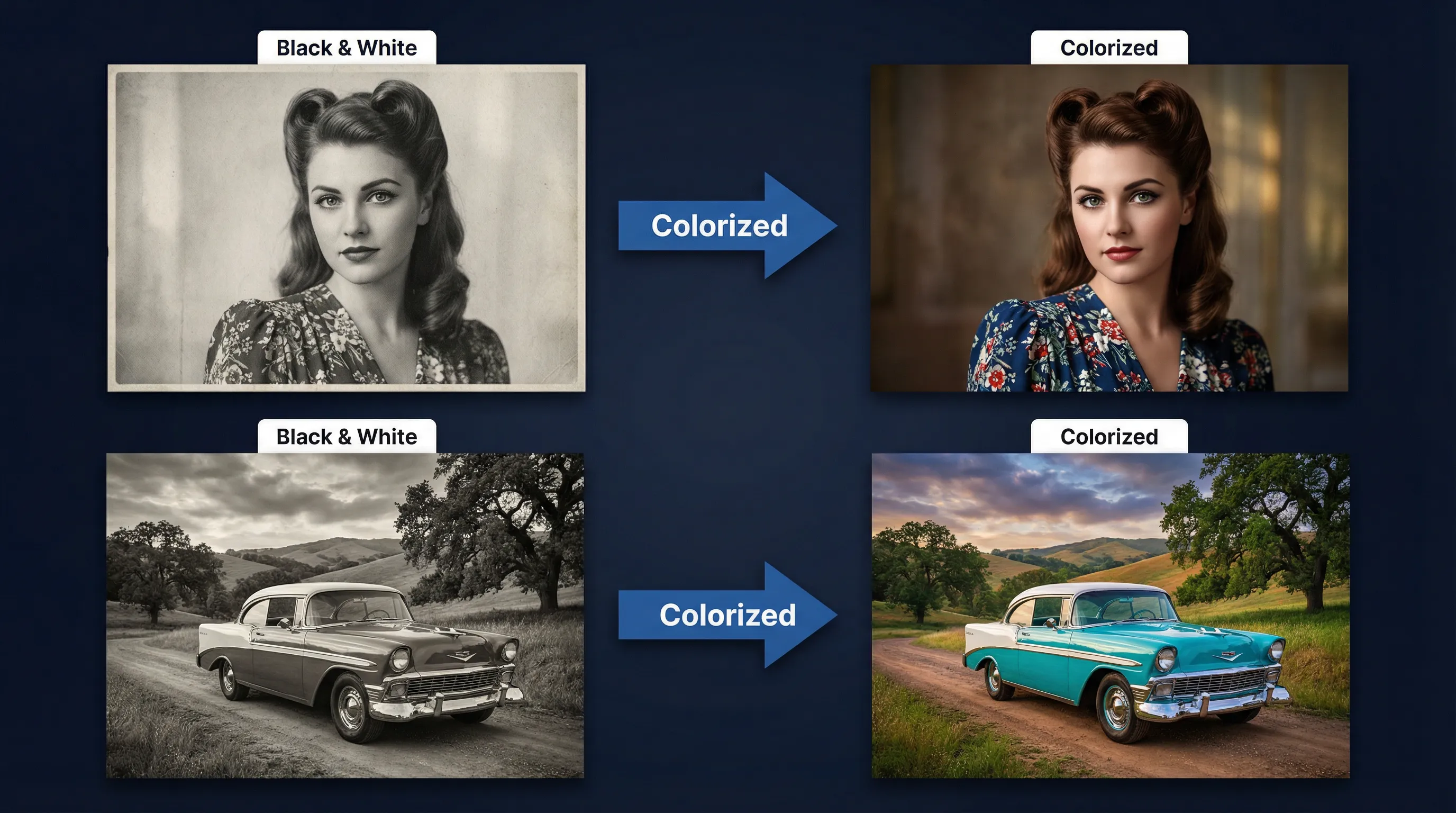
Why Choose SharkFoto Image Colorizer
Professional-grade colorization powered by advanced AI algorithms for authentic color restoration.
Automatic Colorization
One-click colorization with no manual adjustments needed. Our AI analyzes and applies realistic colors automatically.
Restore Memories
Bring old family photos back to life with vibrant, natural-looking colors. Preserve precious memories for generations.
Realistic Colors
AI learns from millions of images to apply historically accurate and contextually appropriate colors.
Instant Results
Get colorized images in seconds. No waiting, no complex processing. Fast and efficient colorization.
Multiple Formats
Support for JPG, JPEG, PNG, and WEBP. Upload any format and download colorized images in your preferred format.
Privacy Protected
Your images are processed securely and automatically deleted. Your privacy and data security are guaranteed.
Powerful Features for Every Need
Advanced AI colorization technology with professional-grade features.
Smart Color Detection
AI analyzes image content and applies contextually appropriate colors based on object recognition.
Natural Gradients
Smooth color transitions and natural gradients for realistic, professional-looking results.
Edge Preservation
Maintains sharp edges and details while applying colors for crisp, high-quality output.
Batch Processing
Colorize multiple images at once with consistent settings for efficient workflow.
High Quality Output
Generate high-resolution colorized images suitable for printing and professional use.
One-Click Operation
Simple, intuitive interface. Upload and colorize with a single click. No technical skills required.
Use Cases & Applications
Perfect for historians, genealogists, photographers, and anyone wanting to restore precious memories.
Family Archives
Restore and colorize old family photos to bring memories back to life. Share vibrant versions with family members.
Historical Research
Colorize historical photographs for research, publications, and educational materials with authentic colors.
Genealogy Projects
Enhance genealogical records and family trees with colorized ancestor photos for better documentation.
Documentary & Media
Colorize archival footage and photographs for documentaries, films, and media productions.
Museum Collections
Enhance museum exhibits and collections with colorized historical artifacts and photographs.
Publishing & Archives
Colorize archival images for books, magazines, websites, and digital publications.
Technical Specifications
Professional-grade specifications for image colorization.
Input Formats
JPG, JPEG, PNG, WEBP
Supported image formats
Processing Time
5-20 seconds
Per image colorization
AI Model
Advanced Colorization
State-of-the-art AI technology
Max Image Size
Up to 50 MP
High-resolution input support
Color Accuracy
Context-Based
Intelligent color selection
How It Works
Colorize your black and white photos in just three simple steps.
Upload Photo
Upload your black and white photo in JPG, PNG, WEBP, or other supported formats. Drag and drop or click to select.
AI Colorization
Our AI analyzes the image and applies realistic, contextually appropriate colors automatically. No adjustments needed.
Download & Share
Download your colorized image instantly. Share with family, use for projects, or print for preservation.
Why SharkFoto Stands Out
Compare our AI Image Colorizer with manual colorization and other tools.
| Feature | SharkFoto AI | Manual Colorization | Other Tools |
|---|---|---|---|
| Speed | ⚡ Seconds | Hours | Minutes |
| Ease of Use | ✓ One-Click | Complex | Moderate |
| Color Accuracy | ✓ AI-Powered | Variable | Good |
| Cost | ✓ Affordable | Expensive | Variable |
| Consistency | ✓ Always Good | Varies | Depends |
| Batch Processing | ✓ Yes | No | Limited |
Security & Privacy
Your data security and privacy are our top priorities.
Encrypted Transmission
All data transmitted using industry-standard SSL/TLS encryption for maximum security.
Auto-Delete
Images are automatically deleted from our servers after processing. No permanent storage.
Privacy Policy
We comply with GDPR, CCPA, and other privacy regulations. Your data is never shared.
Secure Servers
Processing on secure, isolated servers with advanced security protocols and monitoring.
Anonymous Processing
Process images anonymously without creating an account. No tracking or profiling.
Certified Security
Regular security audits and certifications ensure compliance with industry standards.
Frequently Asked Questions
Find answers to common questions about our AI Image Colorizer.
How accurate is the colorization?
Our AI is trained on millions of images to provide contextually accurate colors. While not 100% historically perfect, the results are highly realistic and natural-looking. Historical accuracy depends on the image content and context.
Can I edit the colors after colorization?
Our tool provides automatic one-click colorization. For advanced color adjustments, you can download the result and use photo editing software like Photoshop or GIMP for fine-tuning.
What image formats are supported?
We support JPG, JPEG, PNG, and WEBP formats. You can upload any of these formats and download the colorized result in PNG format.
How long does colorization take?
Most images are colorized within 5-20 seconds depending on image size and complexity. Results are delivered quickly, allowing you to process multiple images efficiently.
Is my image data secure?
Yes. All data is encrypted during transmission using SSL/TLS. Images are automatically deleted from our servers after processing. We never store or share your images with third parties.
Can I colorize multiple photos at once?
Yes. Our batch processing feature allows you to colorize multiple images at once. Perfect for processing entire photo collections or family archives efficiently.
Ready to Colorize Your Photos?
Bring your black and white memories back to life with vibrant colors today. No credit card required.